Municipal Election
Voting at the Joly Township Office
Township of Joly · Updated October 15, 2026
Voting at the office
You can vote on a computer at the Township office, with help from staff. Voting is by website or by telephone, and your vote is private.
Voting closes Monday, October 26, 2026 at 8:00 p.m. Voting opened Tuesday, October 13, 2026 at 9:00 a.m.
Start here:
- I have my voter card (Voter Information Letter) → go to the next section.
- I do not have my voter card → see "If you don't have your voter card."
If you have your voter card
- Tell office staff you are here to vote and show your voter card.
- Sit at the voting computer. Staff will not look at your screen or your ballot.
- Open the voting website (steps below) and enter your date of birth and the PIN printed on your card.
- Mark your ballot, review your choices, and press Confirm. You cannot change your vote after you confirm.
- Wait for the green Success message before you leave. The system logs you out automatically.
If you prefer, you can vote by telephone instead (steps below).
If you don't have your voter card
You can still vote. Staff will confirm who you are, then give you a new PIN.
- Staff look you up on the voters' list by name and address.
- You show proof of identity and residence: an original document that shows your name and your Joly Township address, such as an Ontario driver's licence, an Ontario Photo Card, or an Ontario Health Card (photo card). The full list of accepted documents is in Schedule 1 of Reg. 304/13.
- No acceptable ID? If your name is on the voters' list, complete Form 9, Declaration of Identity. It is signed in front of office staff at the office. Staff will give you the form (see Appendix A).
- Lost or never received your card? Complete a request for a replacement voter card with staff (see Appendix B). Staff will then issue a new PIN.
- Not on the voters' list? Tell staff. They will help you complete the application to be added to the list. Add form name.
- Once you have a PIN, vote by website or telephone (steps below).
Bring: photo ID or other proof of your Joly address.
How to vote by website
- Open a web browser and go to https://joly.isivote.com/?language=en.
- Enter your date of birth (year, month, day) and your PIN. Select Login to Vote.
- Mark your choices on the ballot. Each race says how many you may choose. You may also select "I decline to vote."
- Select Continue, then check your choices on the review page.
- Select Change to go back, or Confirm to cast your vote.
- A green Success message means your vote was recorded. Close the window.
How to vote by telephone
- Call 833-853-4925 from the office phone or your own.
- Choose English or French when prompted.
- Enter your date of birth and your PIN when asked.
- Listen to each race and follow the prompts to make your choice.
- Listen to the review of your choices, then follow the prompt to confirm. You cannot change your vote after you confirm.
- Wait for the message that your vote was recorded before you hang up.
Need help?
Ask office staff at any time. They can help with the voter card, PIN and forms, but cannot see or influence your ballot.
Township of Joly, 871 Forest Lake Road, Sundridge ON. Phone (705) 384-5428. Office hours until election day (October 26): Monday to Friday, 8:30 a.m. to 4:00 p.m. Regular office hours: Monday to Thursday, 8:30 a.m. to 4:00 p.m.
that do not require an elector to attend a voting place.
internet voting and telephone combination.
Internet voting is a vote anywhere, anytime option using
a computer, tablet, or smartphone from anywhere provided they have an internet connection. With internet voting, an information package
is mailed to every eligible elector advising them of their voting options, dates, and a secret PIN number. Unique
PIN numbers are mailed to electors in individual voting packages. The PIN code, in conjunction with a personal
piece of information (i.e. birth date) would be required for electors to log in and vote.
By combining these two pieces of information, the integrity of the vote is maintained, and the risk of fraudulent
voting can be reduced or minimized. The elector qualifies voter intent through the use of automatic controls
and can review the ballot and make changes prior to submission. The system is programmed to disallow an
elector from proceeding to the next office if their current vote is an over-vote.
anywhere during the defined voting period using a telephone. Qualified electors receive a voter information
package that contains instructions on how to access the system and how to navigate an audio ballot. Most
telephone voting systems rely on the elector to interact with the audio ballot using their telephone keypad in
response to requests.
Official List of Certified Candidates
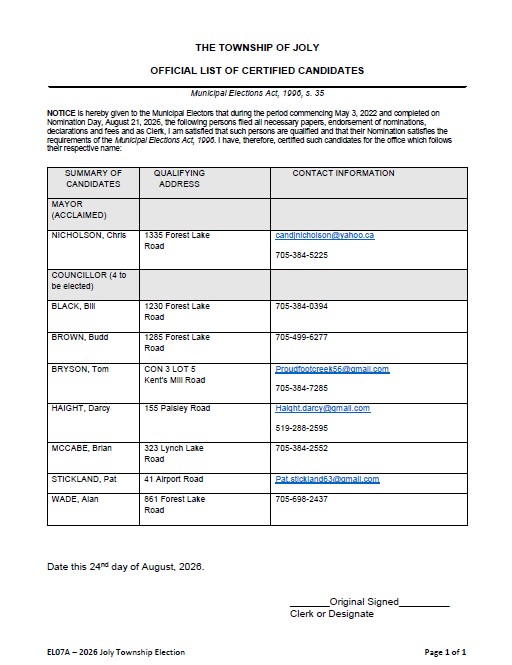
2026 List of Uncertified Candidates
The following candidates have filed their nomination papers in accordance with Section 33 of the Municipal Elections Act and have been certified by the Municipal Clerk. The candidates are listed alphabetically by last name under each office.
Candidate information will be posted here as nominations are received. By accessing a candidate's website/social media account you are leaving the Township of Joly’s website. These websites/social media accounts are in no way affiliated, maintained or monitored by the Township of Joly. Any links provided are for convenience only and do not imply endorsement or approval by the Township of Joly.
Councillor (Four to be Elected)
| Name | Website | Phone | Date Filed | |
| Bill Black | 705-384-0394 | July 15 2026 | ||
| Budd Brown | 705-499-6277 | August 12 2026 | ||
| Tom Bryson | [email protected] | 705-384-7285 | August 6 2026 | |
| Darcy Haight | [email protected] | 519-288-2595 | August 5 2026 | |
| Brian McCabe | 705-384-2552 | August 13 2026 | ||
| Pat Stickland | [email protected] | August 21, 2026 | ||
| Alan Wade | 705-698-2437 | July 16 2026 |
Mayor ( One to be Elected)
| Chris Nicholson | [email protected] | 705-384-5225 | Aug 11 2026 | |
Election Information
For a nomination package please come to the office to pick up and set up an appointment to complete nomination process with the Clerk.
Official List of Certified Candidates
Declaration of Acclamation to Office
School Board Trustee
Near North District School Board - Zone 5 (1 to be elected)
Jason Newman 705-477-3793, English Public - Near North School Board Zone 5
Nipissing Parry Sound District Catholic School Board (1 to be elected)
Conseil Scolaire Public du Nord Est de l'Ontario (1 to be elected)
Bruce Cazabon 705-499-0164, French Public
Conseil Scolaire Catholique Franco-Nord - SE (1 to be elected)
Ministry of Municipal Affairs & Housing Election Information
2026 Third Party Advertisers' Guide
MPAC’s role in Ontario’s municipal
and school board elections
MPAC (Municipal Property Assessment Corporation) is responsible for collecting
school support designation information, under the Education Act, to provide to
Elections Ontario for the creation of the Preliminary List of Electors (PLE) for the
municipal and school board elections.
School support has two purposes
1. Assessment purposes (i.e. allocation of tax dollars)
2. Electoral purposes (i.e. voting)
Whether you own or rent your home, your property is linked to a school board – even if you don’t
have children or your children aren’t currently attending school. While you’re not required to make
a designation, if you are eligible, you have the option to choose which school board you support. If
you don’t make a choice, your support will default to the English-Public school board.
Changing your school support designation
MPAC will update school support designation revisions received from your municipality. However, to
ensure your preference is also reflected in the direction of your tax dollars, property owners and
tenants are encouraged to update their information through MPAC
AboutMyProperty™ or MPAC’s online tenant portal. A paper Application for Direction of School
Support (and Attestation of Unit Support, if applicable) is also available.
Still have questions about school support? Contact us!
mpac.ca/contact | Toll Free 1 866 296-6722